The first, and in my opinion the best, update to the Hero 7 Black is improved stabilization (which GoPro calls HyperSmooth). Sony introduced optical stabilization to its action cameras in fall 2016; GoPro followed suit with the Hero 5 soon after. The big difference was that GoPro used electronic stabilization (EIS) rather than optical. That difference is important, as optical stabilization happens at the source (the lens), whereas EIS is done in-camera. Purists tend to prefer anything that doesn't alter the image once captured. This was borne out, but the fact that the Hero 5's stabilization was better than none, but still caused visible artifacts (Jell-o effect), usually around the edges of the scene.
Things improved with the Hero 6, but there were still some issues, usually when you make sharp movements (a common occurrence with an action camera of course). Enter the Hero 7. The bad news (sorry, purists) is that GoPro is sticking with EIS. The good news is that it's a solid improvement from the Hero 6 and light years better than the Hero 5. GoPro (predictably) claims that EIS has advantages over OIS: lens movement has a physical hard rail it can't go beyond. With EIS, the software has more leeway.
The Hero 7's stabilization works by using the predictive smarts of the GoPro's GP1 processor. The camera preempts your swerves and keeps the image free from dreaded jerks and jitters. Without a doubt, it is much improved and something that will save hours of footage from hitting the trash folder. I tested the Hero 6 side-by-side with the Hero 7 in a number of situations (walking, skateboarding etc.), and the Hero 6 is prone to occasional jerks that feel like overcorrecting and some general jittering.

These same movements don't appear in the Hero 7, but there is still some natural movement, which you wouldn't find with a gimbal (this is a positive or a negative depending on the "look" you want). Ultimately, movement is expected if you're being active; a gimbal can smooth things out in a way that's not natural. With both cameras mounted on a skateboard, riding on slightly bumpy concrete, the Hero 6 had noticeable "rumble," the Hero 7 still had some (thanks, physics) but the resulting video is much easier to watch.
Why is this my favorite new feature? Because this one thing -- shaky footage -- is really the deal-breaker between an OK shot you might share with friends, and something that looks smooth and ready for the world. There are some more specific benefits, too. I've long wanted to be able to do something simple: walk with a GoPro and wear a lapel mic. It's a basic task, but something the camera wasn't really designed for. With the Hero 7, for the first time, I think they've cracked it. You might not want to do this exact thing, but the fact that you can is a good indicator that things have improved here.
What all this does is make the GoPro much more versatile. If you can grab a smooth establishing shot just with the GoPro in a grip, you no longer need to fumble around with gimbals (or carry them with you). Given that you can turn the GoPro on and start recording with one touch, you can be a lot more spontaneous, with the odds of ending up with something usable much improved.

If you like to shoot in "Linear" mode (which corrects the "fisheye" effect), then the stabilization is even better. HyperSmooth is more effective when the image is cropped (as it is in Linear mode). This happy coincidence means your shots are both more stable, and less warped -- hard to argue with that (though not everyone is a fan of cropping).
GoPro is calling HyperSmooth "gimbal-like." The idea is you can ditch your hand-held stabilizer. For most situations, that's true -- the internal stabilization is going to be enough. But comparing it to a gimbal might even be selling it short. There's something robotic about the way gimbals glide and pitch that isn't always ideal for action footage. Also, we can all agree that not having to mount a gimbal on your noggin is good for everyone. You might think the stabilization in your iPhone or Pixel is pretty good, but your phone doesn't like water or rough-and-tumble -- so the Hero 7 might just be the camera you reach for more often in a number of scenarios.
With the mobile-user in mind, it's a good time to talk about the next main update to Hero 7: live streaming. You've been able to wrangle a video feed from a GoPro live to the internet for a while, but it was limited (or laborious). Now, it's as simple as firing up the GoPro app on your phone and clicking a button. Right now, you're limited to Facebook or RTMP(which can be piped into YouTube etc.), but more native options are coming.
This one is potentially a huge deal. Live video is a feature popping up everywhere, and before the Hero 7, GoPro likely wasn't your first choice. Now that it's a native feature, and given the camera's rugged nature, you can expect to see a wave of people showing off their vacation, adventure and travels in real time. Sure, you could already do that with your phone, but again, you can't put your phone nearly as many places as you can a GoPro. Sadly, you do still need your phone... so no live surfing shots just yet (though that's not impossible), but the next time you go out for a track day, or horse riding or a vert session, you can beam it to the world in real time from your helmet, car or, well, equine friend's perspective.
It's worth circling back quickly to the stabilization; the two make quite a team. The GoPro Hero 7 can now go toe-to-toe with your phone as the life-blogging camera of choice. Previously you might have stuck with your phone for its connectivity (and convenience), but the Hero 7 Black offers enough extra versatility, that it can free up your phone (which remains safely in your pocket). A dedicated camera for in-the-field reporting, live streams and action feeds is arguably better than relying on your precious phone alone.

If I've made a few comparisons to your phone here, that's because there's something of a theme. People have long asked "why use a GoPro when I have a good camera in my phone," and the company seems to be answering them with the Hero 7. Which neatly brings me onto another new feature called "TimeWarp."
You have been able to shoot time-lapse video with a GoPro since, basically, forever. That was great for static shots (think: people dashing by on a sidewalk). If you wanted to shoot one while moving, it was a bit of a gamble as to how it might come out. TimeWarp solves this. If you're familiar with Instagram's HyperLapse you'll be right at home here. In short, it adds stabilization to a time-lapse for smooth, time-crunching videos. It's great for showing off more mundane parts of your adventure (a long hike) in short bursts. I tested it on the switchbacks of a trail in Yosemite, and it's a fun, simple and effective way to add variety to your footage.
As with regular time-lapses, you can adjust the "speed" (photo interval), just with TimeWarp, you select how much you want to rev things up (2/5/10/15 and 30 times normal speed). At first, it's a little weird. The camera looks like it's recording (a solid red dot on the display), but the timer crawls along -- because it's showing you the length of the resulting video, not the length of time it took to record it (which makes more sense, of course). You might never need TimeWarp, but there will be plenty of people who welcome the addition to the toolbox.
I hinted in the intro that there wasn't a host of new shoot modes. TimeWarp might appease the video lovers, but for the photography crowd, there's SuperPhoto. The hyperbolic name is really code for "better" HDR. This, along with stabilization, is a feature that's been here before in various forms (WDR in the Hero 5, and HDR in the Hero 6). This time around it claims a whole new method of layering/processing your images -- local tone mapping rather than global tone mapping, to be precise.

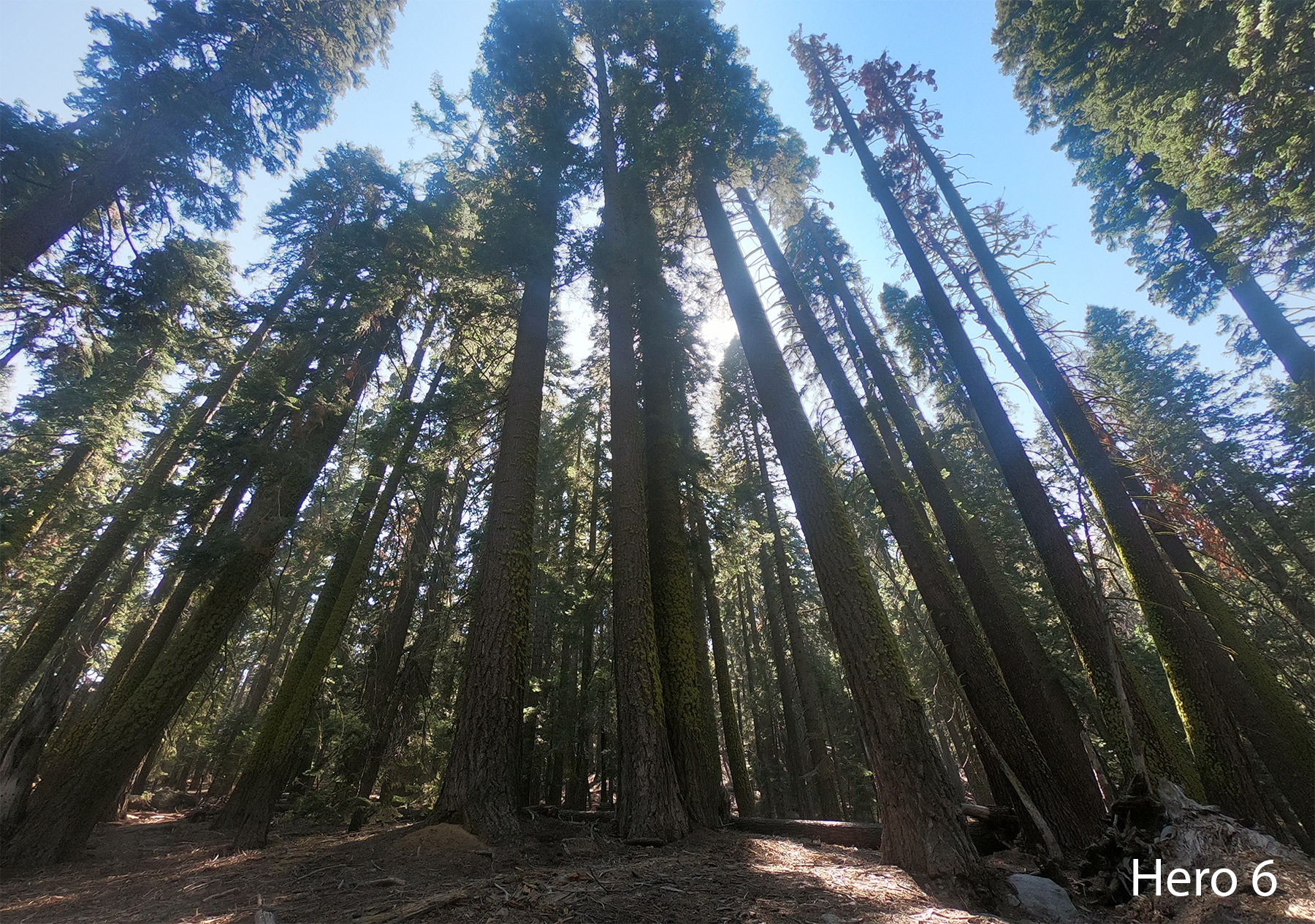
What this means for you is that your final image includes more detail in areas that the older method might have smoothed out in the processing. I tested this in a number of situations, and the difference is clear. I shot some trees in Yosemite with the sun behind them, and despite that, the details of the bark are visibly clearer than in the same photo with the Hero 6. Similarly, a shot I took from Berkeley looking across the bay to San Francisco presented far more definition on the sun-drenched water and the rocks in the foreground than the older sibling could muster.
Other photographic improvements come in the form of a timer right where you want it (on the left of the screen), so you can better compose yourself for selfies (or family portraits by the log fire). There's also a revamped zoom slider. Digital zoom is always a slight compromise in image quality, but it's nice to have an easy tool to reframe your pictures from the camera itself.